Production teams: bills of materials and substitutions under control
For your shop floor managers and engineers, the bill of materials is the foundation of everything that gets produced, and everything production costs. When it changes without visibility, the gaps ripple into procurement, schedules and margins. Odoo 20 gives them more direct tools to keep it accurate.
Bills of materials compared and managed from one place
When several versions coexist for the same product, or when you are weighing two ways of making it, three changes make your engineers' work easier:
- BoM comparison: bills of materials can now be compared based on the product quantities used, so you can see exactly what sets them apart
- Components and sub-assemblies: they can be viewed and managed directly from the bill of materials form
- Overview forecast: it is easier to read now that the "Status" and "Availability" columns have been merged
Components replaced without missing anything
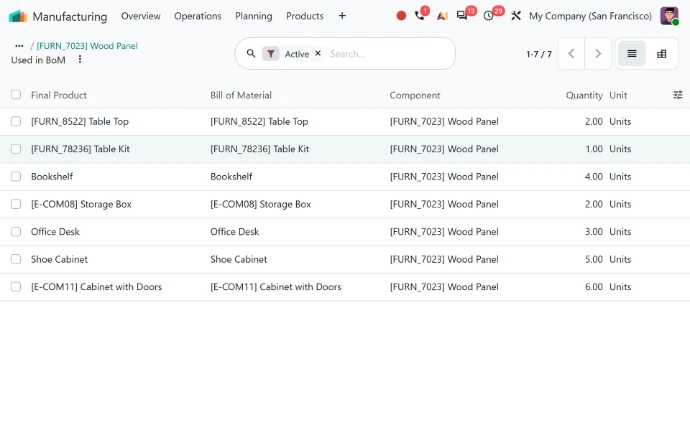
Substituting a component that has become unavailable or obsolete is routine for a manufacturer, yet still a delicate job: you need to find every bill of materials that uses it. On the product form, the "Used in" smart button now displays the component lines of the corresponding bills of materials, which makes replacements and other changes easier. The same action can be launched from the bill of materials list and form views. Your teams can gauge the full scope of a substitution before making it, instead of discovering afterwards a bill of materials still on the old version.
Continuous production, set on the bill of materials
Produced quantities can now be recorded on work orders. When "Continuous Production" is enabled on the bill of materials, subsequent operations start as soon as certain quantities are ready. For a manufacturer whose routings chain several operations together, the assembly station no longer has to wait for machining to finish the entire order. It’s a configuration choice you make product by product, in line with how you plan your production in real time.
Shop floor managers: see the real cost of every manufacturing order as it progresses
If you launch a manufacturing order and only find out what it cost once it’s finished, there’s little room to react. Odoo 20 gives your shop floor managers and cost accountants the same visibility as the order moves forward:
- MO Cost: in the MO Overview, this field shows the provisional cost while the manufacturing order is in progress, and the actual cost once it is complete
- Subcontracting: for subcontracted products, the cost of replenishments shown in the MO Overview takes component costs into account
- Extra costs: a dedicated field on the bill of materials form lets you record them for a manufacturing order, so the calculated cost includes what the bill of materials alone does not cover
Odoo Inventory: valuation that tracks your actual costs
Between the moment a product is delivered or consumed and the moment its final cost is known, things can still change: a landed cost comes in, or a vendor bill differs from the purchase order. With Odoo 20, when a product's cost changes after it has been delivered or used, the delivery's value is updated retroactively, along with the invoice cost when you use perpetual accounting. Cost of goods sold is therefore updated based on the costs actually incurred.
For accounting and finance teams, the period close becomes more consistent as well. In perpetual accounting, accrual entries that impact inventory valuation can be created directly from the inventory valuation closing report: Bills To Receive, Billed Not Received, Invoices To Be Issued and Invoiced Not Delivered. The generated journal entry impacts the inventory valuation account directly instead of going through the stock variation account. Reliable valuation is the groundwork for any effort to optimize your inventory management.
Purchasing: vendor offers compared before you order
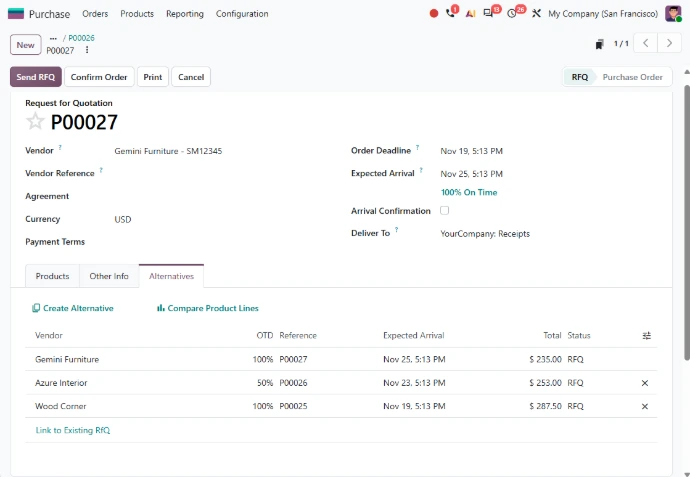
For your buyers, anticipating production costs starts with comparing vendor offers for each component. The alternatives comparison screen has been improved, making it simpler for them to choose the best option among several offers.
When you buy in a unit or packaging different from the product's, say by the case while you consume by the unit, the product catalogue displays the cost in the product's unit next to the cost in the purchase unit. Your buyers compare prices that are genuinely comparable before placing the order.
Supply chain teams: consistent flows between your companies
When a manufacturing group runs several companies, your supply chain teams organize the flows between them every day: production site, sales subsidiary, warehouse. Odoo 20 improves these intercompany flows on several fronts:
- Resupply: routes let you resupply one company from another
- Delivery: a sales order can be delivered from another company's warehouse, or even from its pickup points
- Valuation: valuation costs of transferred products are properly carried over between companies
- Linked orders: price or quantity updates on linked sales and purchase orders are communicated to the other company
The same holds for a distribution business structured as several entities: flows that stay consistent in both quantity and value from one company to the next.
For companies shipping by road in Europe, Odoo 20 lets you download a CMR document from deliveries: the consignment note defined by the Convention on the Contract for the International Carriage of Goods by Road, prefilled based on the transfer information, which limits re-entry when goods leave.
Shop floor and warehouse: getting ready for Odoo 20
Not every new feature matters equally to every company. Before setting priorities, a few points are worth checking:
- Bills of materials: comparison and component replacement matter most to manufacturers whose bills of materials change often
- Inventory accounting: retroactive valuation updates and accrual entries mean checking how you account for inventory
- Organization: intercompany flows and the CMR document only concern certain organizations
The right place to start is with your teams’ day-to-day work: identify where a manufacturing order, a cost, or a substitution is slipping out of your shop floor managers’ control today, and where a vendor offer or an intercompany flow is getting past your procurement and supply chain teams. Then, prioritize the changes that put them back in charge. Whether you already use Odoo Inventory or are considering Odoo Manufacturing to structure your production, the challenge is the same: get the most out of Odoo 20 without disrupting operations that simply can’t stop.

Where are your costs and flows slipping out of control today?
Talk with our consultants to assess the impact of Odoo 20 on your production costs, bills of materials, and flows, and to set the right priorities for your production, supply chain, and purchasing teams.