
Marketing and communications: launch a campaign page instantly
Pages built from a simple description
When a campaign is coming together, your team needs to get a page online quickly, without waiting for the technical team’s schedule. The AI Website Assistant has received a series of upgrades to help with exactly that: you describe what you want in plain language, with no code to write, and it selects and edits snippets, adds images from Unsplash or generates them, and can pull in content from the web. When you create or edit a page, it can now:
- Create new pages: you can now ask it to create a new webpage
- Use your database: it relies on your records, such as products or events
- Take inspiration from other websites: it can also recreate a page on your website from a URL you provide
- Add interactive elements: counters, tabs or animations
For a services business running a webinar or an open house, the event page can pull details directly from the event already recorded in Odoo, instead of having everything typed in again.
Targeted edits your team can handle independently
The assistant can also create or edit your webforms and make changes to your menu: creating, renaming, moving, nesting, reordering or deleting items. The "Select Elements" option lets you point it to the exact block your request is about, which cuts down on back-and-forth. These everyday adjustments, which could otherwise mean a request to the IT team, become something your marketing team can handle directly. To help you stay in control of your content, the Website editor flags the building blocks that were generated or modified by the assistant, so your team knows which ones to review before publishing. Your Odoo website can then keep pace with your campaigns and offers.
Incoming requests: webforms that help your team qualify leads
Qualifying incoming requests takes time when the information received is incomplete or poorly filled in. For a services business, the contact or quotation request form is often the main way in: the better it is designed, the less your marketing and communications team has to follow up before passing a request on to sales. Odoo 20 gives you more control over the information collected:
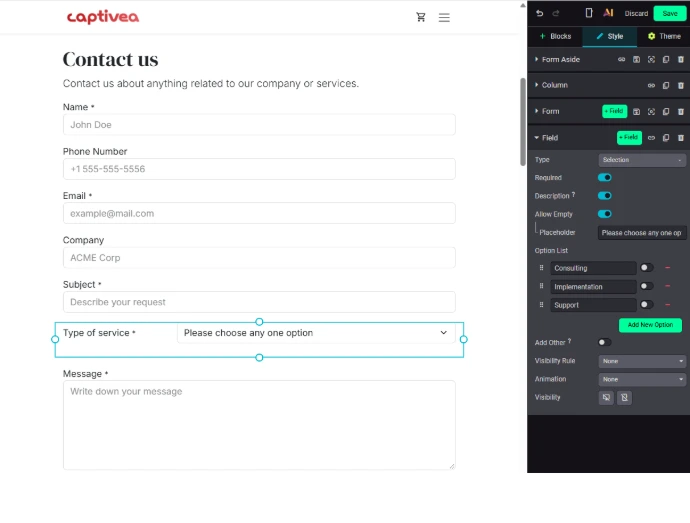
- Dropdown lists: they can be set with no default value, so visitors have to choose, for example, the type of service they are interested in
- Text fields: they accept character limits
- File uploads: they can be restricted to certain file types
- Email addresses: submissions can be limited to certain domains
Field labels can be edited directly in the form, and inner content can be dragged between fields to create sections or set titles. For visitors who prefer an immediate exchange, a new WhatsApp widget snippet lets them start a conversation with your business in one click: structured requests go through the form, quick questions through a direct channel.
Google: stronger Odoo website SEO from the ground up
Structured data added by default
For search visibility, the most notable change is this: Odoo 20 now adds structured data by default to the HTML of your web pages. This data helps search engines interpret your content and opens the door to Google rich results, with no specific setup required from your team. Two technical refinements round out this foundation: responsive image sizing (srcset) improves mobile performance, and the SEO logic has been refined to avoid duplicate content on paginated pages.
AI to rework the SEO of your pages
Odoo 20 also lets you use AI to improve the SEO of a web page. It is a useful aid for reworking existing content, as long as your team keeps an editorial eye on the suggestions. One point to plan for: all Odoo 20 AI features, including the website assistant, now require credits, which can be purchased through IAP. To go further, take a look at our approach to Odoo SEO.
AI assistants: a site that is easier to read with llms.txt
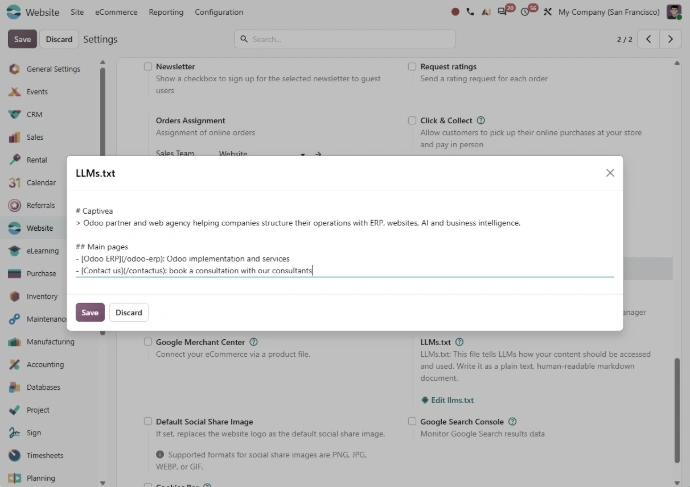
Search engines are no longer the only way to find information online: many people now also ask their questions to AI assistants. Odoo 20 factors this in with a new feature that is easy to configure: you can create an llms.txt file directly from the website settings. This file helps large language models understand and use your website content more effectively. It remains an add‑on and does not replace the need for careful work on your page content. In the same spirit, when a link to your Odoo website is shared on a social platform, a preview card is now displayed.
Audience tracking: easier campaign measurement for your marketing team
Tracking your audience is part of the daily routine for your marketing and communications team: checking whether a campaign page is attracting traffic, whether an activity is bringing in visits. Google Analytics or Google Tag Manager can now be configured using a single ID field in the Website settings. Connecting the site to your analytics tools is handled in the same place as the rest of its settings, with no separate technical step.
Odoo 20: where to begin with your website
Not every new feature will have the same impact for your team. Priorities depend on the role your site plays:
- A site that generates enquiries: the webform improvements and the WhatsApp widget deserve to be at the top of your action plan
- A site you update frequently: the AI Website Assistant can reduce the effort involved in creating and updating pages
- A visibility challenge: structured data, the technical SEO improvements and the llms.txt file deserve a detailed look first, keeping in mind that no single setting can guarantee a ranking
The most effective approach is to start from how your marketing and communications team keeps the site running today: the pages it publishes, the requests it handles, the changes it still has to wait on technical teams for. For a services business, where the website is primarily a source of enquiries, that day-to-day reality should guide which features to turn on. Whether you are planning to create an optimised website or improve the one you have, Odoo 20 brings together the tools to build it and make it visible.

Is your website generating the enquiries your services business needs?
Speak to our consultants to review the visibility of your Odoo website and identify the Odoo 20 features that will give your marketing and communications team more autonomy.