
Odoo 20 upgrade: separating what matters from the rest
The Odoo 20 release notes are long, but not every item deserves the same attention. For an existing database, the right approach is to split the changes into two groups. The first group enriches your current setup: new options, clearer views, shortcuts. These mostly call for some time to explore. The second group replaces one mechanism with another, or merges or removes an app. These are what drive the upgrade effort, because they can make a customization, a report or a work habit obsolete. For your IT team and your key users, preparation starts with this second group: it is short, but it deserves a methodical approach.
Access rights: the first thing to plan for
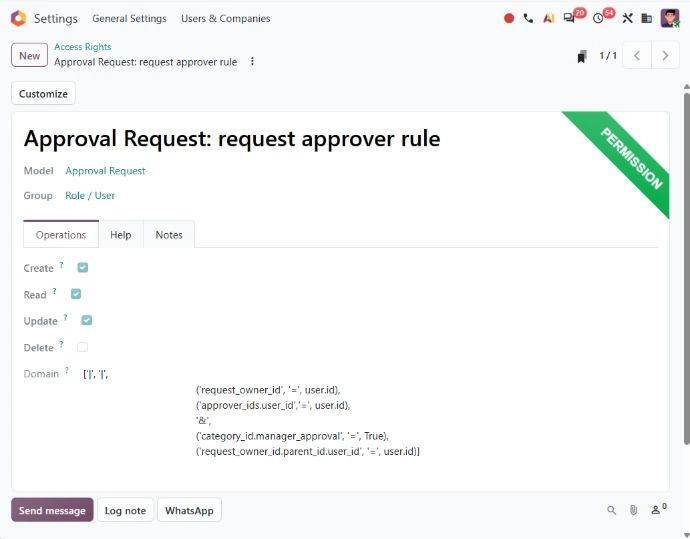
Access rights have been simplified: record rules are removed, and a domain is now added directly on the access right to determine which records it applies to. The principle stays the same, each profile sees only the data that concerns it, but the way you express it is different. If your database relies on record rules, whether standard ones or rules created for your needs, their logic will have to be carried over into this new model and then checked profile by profile.
This work matters all the more because access rights touch data confidentiality and the governance of your information system. It pays to start early, with the business owners who know each team's real needs. One thing makes post-upgrade checks easier: user group changes are now logged in the user's chatter and in the console logs. If your database includes custom developments, this work fits naturally into a review of your Odoo customization.
Reorganized apps: getting your teams ready for new landmarks
The second set of changes to plan for: several apps have been merged or removed. For the teams involved, it is not just screens that move, but menus, access and familiar landmarks.
Payroll and Employees: new landmarks for HR
In Payroll, work entries and the Planning-Payroll integration have been removed, and work entry types have been merged with time off types. If your payroll calculations or reports rely on work entries, review this first with your payroll managers, because it affects a sensitive process where errors are not an option. Separately, the Remote Work module has been merged into the Employees app: a lighter change, but your HR team will find that information in a new place.
Field Service now part of Planning
The Field Service app has been removed and its features are now integrated into Planning. For a services company that works on site at its customers' premises, the change is concrete: interventions are now prepared in Planning, and planners, technicians and customer service switch to a different reference app. The views, filters and habits built around Field Service need to be listed and rebuilt in the new tool. Worksheet templates also now use property fields instead of Studio fields: if you adapted them with Studio, plan to review them during testing.
Artificial intelligence: credits to budget and terms to update
If your teams already use Odoo's AI features, two points deserve the attention of your leadership and your IT team. First, all AI features now need credits, which can be bought via IAP. It is wise to estimate your usage before upgrading and build it into your budget; the new "My Subscription" page, accessible from the user menu, centralizes your subscription plan and IAP services. Second, "topics" are now called "skills": the collections of instructions and tools that define how an AI agent behaves in a specific context have a new name. It looks like a detail, but it affects your internal guides and training materials.
Accounting, Inventory, Manufacturing: targeted adjustments to check
The remaining changes are more targeted. None of them is a reason to delay your project on its own, but each can affect a report, a filter or an internal procedure. These points to check before upgrading belong on your checklist, assigned to the relevant key users:
- Accounting: some payment statuses are renamed and the structure of the chart of accounts evolves
- Inventory, Manufacturing and Project: some wizards, buttons and reports are simplified or replaced
- Technical aspects: change tracking and icons work differently
- Payment methods: SOFORT is no longer supported
In Project, one replacement deserves particular attention when your business is managed engagement by engagement: the profitability report in the project dashboard has been removed, and budget as well as actual and projected margins are now analyzed in new dedicated reports. If your leadership tracks engagement profitability from that report, its reference points need rebuilding before the switch. For a manufacturing or distribution company, it is the Manufacturing and Inventory changes that call for testing on real cases.

Preparing your Odoo upgrade: inventory, testing and training
Once the changes are identified, preparation follows three steps:
- Take stock of your database: list everything that makes it unique (modules built for you, Studio customizations, record rules, reports, automations, integrations with other tools), then match it against the changes described above to know exactly which items to adapt, replace or simply check
- Test on a copy: never directly in production, testing lets your key users replay their real processes, check each profile's access and validate the reports your decisions depend on
- Train your users: renamed statuses, relocated menus or a merged app are enough to throw off users who know their way around; training focused on the changes specific to each team eases adoption
Taking stock is also a good moment to retire custom developments that the standard now covers, and gaps found during testing are far easier to fix than after go-live. Dedicated migration support gives these steps structure and makes the transition safer, then Odoo support takes over once the new version is live.
Every database is different, so the scope of your upgrade depends on your apps, your custom developments and how your teams work today. By dealing first with access rights and reorganized apps, you focus the effort where it counts and approach Odoo 20 with teams ready to make the most of it.
Is your database ready for Odoo 20?
If you run a services company, talk to our consultants to scope the upgrade of your database to Odoo 20, from intervention planning to payroll, and set priorities with your teams.