
Odoo 20 eCommerce: tax-included or tax-excluded prices by pricelist
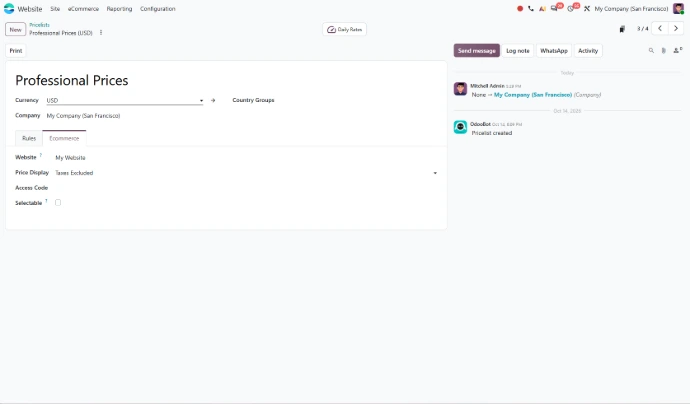
In Odoo 20, you set at the pricelist level whether displayed prices include or exclude taxes. Consumers see tax-included prices, business buyers see tax-excluded prices, all on the same website. The pricelist selector is also now available on every page of your eCommerce website. For your sales team, the pricelist becomes the entry point to every online customer relationship: it determines what each buyer sees, whatever their profile.
The same logic extends to payments, since a payment provider's use can be restricted by pricelist and by minimum and maximum amounts. To review which options fit your markets, explore Odoo payment gateways.
Catalog: clearer navigation, tailored to each website
Range filters for numerical attributes
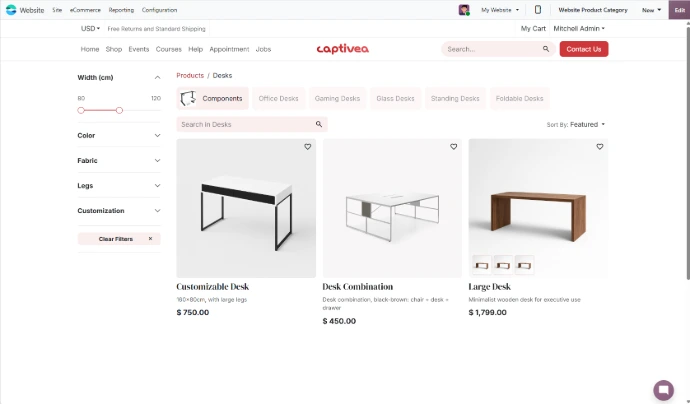
When products differ by size, capacity or power, finding the right item can quickly become tedious. Odoo 20 introduces the Range display type for numerical attributes, so customers can filter products with a range slider instead of ticking values one by one. For your marketing team, that means clearer navigation without multiplying categories.
Units and packaging specific to each website
Units and packaging can now be restricted by website. For a distribution company running several websites, one for business buyers and another for consumers, each store then offers only the packaging options that make sense for its customers.
After-sales: smoother returns and requests
Returns started from the customer portal
With Odoo 20, customers can return products from the customer portal. They start the process from the same place they already check their orders, rather than by email or phone. Behind the scenes, your team works with a simplified return process in Inventory, where the old return wizard has been removed. For your customers, consumers and businesses alike, the process becomes more self-service.
Withdrawal requests handled through your forms
If you sell to consumers, you probably receive withdrawal requests. Odoo 20 adds a new action to contact forms for managing them. Rather than letting these requests get buried in a shared inbox, you can handle them in a dedicated flow. For stores selling in Europe in particular, this is worth reviewing carefully when you configure your website.
Order value and conversion: levers for your marketing team
Cross-sell suggestions generated automatically
Linking every product to the right accessories, optional products and alternatives takes time, especially on a large catalogue. Odoo 20 can now generate these cross-sell suggestions automatically for your eCommerce products. Shoppers find what complements their purchase, or what might suit them better, more easily, and your marketing team gains a lever on the value of every cart without filling in each product by hand.
Follow-ups, rewards and reviews that run on their own
Three updates help bring customers back and extend the relationship after the purchase:
- Abandoned carts: follow-ups can now go through WhatsApp, with a message that brings the customer back to complete the order.
- Loyalty: cart notifications and the cart summary now show progress bars toward unlocking a reward.
- Customer reviews: review request emails can be automated, with a delay you set after order confirmation.
A more flexible buying journey
Other settings smooth out the path to purchase:
- Delivery date: customers can select a preferred delivery date.
- Availability: products can be automatically unpublished and republished based on stock availability, so shoppers don't land on items they can't order.
- Categories: you can block sales for an entire category while still displaying its product prices.
Together, these settings help you optimize your e-commerce sales without piling up custom development.
Store management: better-tracked orders, more reliable data
An e-commerce order dashboard
A new dashboard in the orders list view gives a quick overview of your e-commerce orders and their status, making it easier for your sales team to spot the orders that need attention.
Simplified stock, online and in store
For a retail business selling both in a physical store and online without using the Inventory app, Odoo 20 brings simplified inventory management to both e-commerce and Point of Sale. In each case, a single on-hand quantity is displayed per product and no transfers are required, so your team keeps track of what matters without configuring warehouses or stock moves.
More reliable Google Analytics data
GA4 e-commerce event tracking coverage and data quality have been improved to fully comply with the Google Analytics 4 specifications. For your marketing and communications team, that means a sounder basis for analyzing the sales funnel and measuring the impact of campaigns.
An AI assistant for your product pages
From the Shop page, you can ask the AI assistant to generate product images or to change a product's name, price or description. It helps you enrich your catalogue or fine-tune a listing without leaving your website. Keep in mind that AI features in Odoo 20 run on credits.
H2 · Your Odoo 20 online store: the decisions to prepare
For a store building a business clientele, or a distribution company selling to both resellers and consumers, a few decisions shape the move to a single store:
- Pricelists: which customers belong to which pricelist, with which tax display and which payment methods.
- After-sales: how to handle portal returns and withdrawal requests.
- Cross-selling: which automatically generated suggestions to keep or adjust.
- Follow-ups: which channels and automated messages to switch on, from abandoned carts to review requests.
The most effective approach is to start from your priorities, whether that's order value, conversion or post-purchase experience, and then select the features that serve them. Whether you're launching your Odoo eCommerce store or growing an existing one, the way you organise your pricelists remains the foundation every other new feature builds on.

How can one store serve both consumers and businesses?
Talk to our consultants to organise your pricelists and payment methods, and serve consumers and business buyers from a single Odoo 20 online store.